How Mancave IT Services Fixes Very Slow Laptops & PCs with Full Software Services & Professional Tune-Ups
Few things are more frustrating than using a slow laptop or computer. Whether it’s taking minutes to start up, freezing during work, lagging while browsing, or struggling to run software, slow PCs can seriously affect productivity and day-to-day usage.
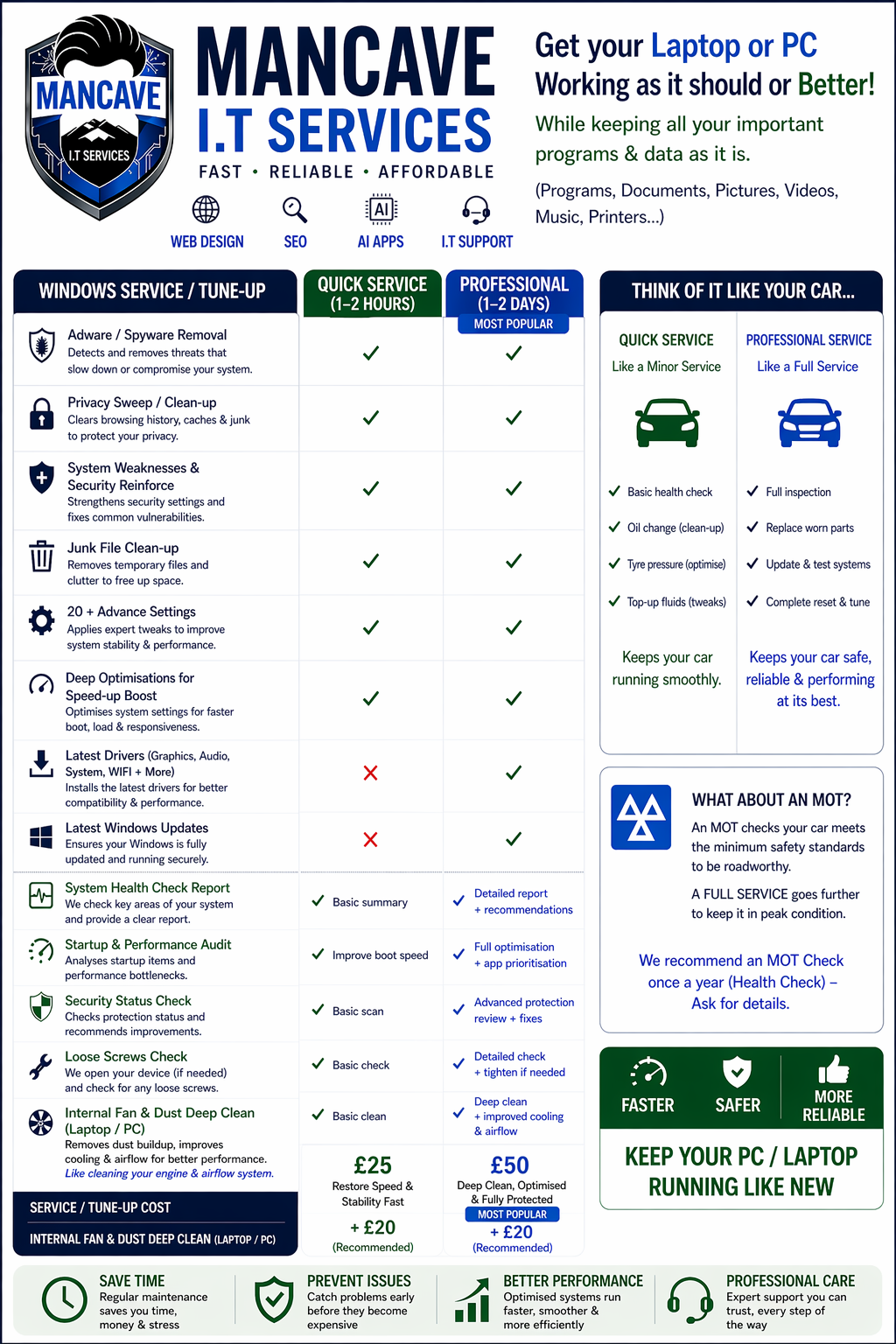
To help solve these problems, Mancave IT Services provides professional laptop and PC tune-up services designed to restore performance, improve speed, remove software issues, and extend the lifespan of devices.
Their complete software optimisation and tune-up services help businesses and home users get their systems running smoothly again without the immediate expense of replacing hardware.
Why Laptops & PCs Become Slow
Over time, computers naturally slow down due to a range of software and system-related issues.
Common causes include:
Too many startup programs
Malware or viruses
Corrupted software
Outdated drivers
Windows update problems
Excess temporary files
Fragmented storage
Background applications consuming resources
Low available memory
Unoptimised system settings
Without regular maintenance, these issues can gradually reduce system performance and reliability.
Full Software Service & PC Tune-Up Solutions
Mancave IT Services provides a complete software optimisation service aimed at diagnosing and resolving performance bottlenecks.
The tune-up process is designed to improve:
System startup speed
Overall responsiveness
Software performance
Internet browsing speed
System stability
Device reliability
This helps restore laptops and PCs to a much faster and more efficient operating state.
Comprehensive System Diagnostics
The first step in the process involves identifying the root cause of performance problems.
Mancave IT Services performs detailed diagnostics to check for:
Software conflicts
Operating system issues
High CPU or RAM usage
Disk performance problems
Malware infections
Driver issues
Startup bottlenecks
Background process overload
By analysing system performance thoroughly, the correct optimisation strategy can be applied effectively.
Startup & Background Process Optimisation
One of the most common reasons computers become slow is excessive startup software and unnecessary background applications.
Mancave IT Services improves performance by:
Disabling unnecessary startup programs
Removing unused applications
Reducing background processes
Optimising system services
Improving boot performance
This can significantly reduce startup times and improve overall responsiveness.
Virus, Malware & Spyware Removal
Malware infections are a major cause of slow computers and unstable performance.
Mancave IT Services provides complete malware and virus removal services to eliminate:
Viruses
Spyware
Adware
Browser hijackers
Unwanted software
Malicious background processes
Removing harmful software helps restore system speed while improving security and stability.
Windows & Software Optimisation
Operating systems and software require regular maintenance to perform efficiently.
Mancave IT Services carries out software optimisation tasks including:
Windows performance tuning
Driver updates
Software updates
Registry cleanup
Temporary file removal
Disk optimisation
Cache cleaning
Error correction
These improvements help ensure smoother and more reliable system operation.
Internet & Browser Speed Improvements
Slow web browsing is another common issue caused by software clutter and poor optimisation.
To improve internet performance, Mancave IT Services can:
Optimise browsers
Remove harmful browser extensions
Clear unnecessary cache files
Fix DNS-related issues
Improve browser responsiveness
Remove adware affecting browsing speed
This results in faster and more stable internet performance.
Laptop & PC Health Checks
In addition to software optimisation, system health checks help identify potential hardware-related issues before they become serious problems.
Checks may include:
Hard drive health monitoring
RAM diagnostics
Temperature monitoring
System stability testing
Performance benchmarking
This helps ensure devices remain reliable and operate efficiently long term.
Improving Performance Without Replacing Your Computer
Many users assume a slow computer means they need to purchase a new device.
In reality, professional tune-up services can often restore significant performance improvements at a much lower cost.
Benefits of optimisation include:
Faster startup times
Improved multitasking
Better software performance
Reduced system crashes
Faster internet browsing
Increased device lifespan
Improved reliability
Better user experience
For many systems, software optimisation can make an older computer feel dramatically faster.
Support for Home Users & Businesses
Mancave IT Services provides tune-up and optimisation services for:
Home laptops
Office computers
Business workstations
Gaming PCs
Student laptops
Remote working setups
Their services are tailored to both individual users and business environments.
Why Choose Mancave IT Services
Mancave IT Services provides professional IT support and computer optimisation services designed to improve performance and reliability.
Their services include:
Laptop and PC tune-ups
Malware and virus removal
Software optimisation
Windows troubleshooting
Hardware upgrades
Managed IT support
Networking solutions
Data backup services
By combining technical expertise with practical optimisation solutions, Mancave IT Services helps users get the best possible performance from their devices.
Final Thoughts
Slow laptops and PCs can negatively impact productivity, business operations, and everyday computer use. However, many performance issues can be resolved professionally without replacing the entire system.
Through comprehensive diagnostics, software optimisation, malware removal, and full system tune-ups, Mancave IT Services helps restore speed, stability, and reliability to slow computers.
For businesses and home users experiencing poor computer performance, investing in a professional PC tune-up service remains one of the most cost-effective ways to improve system efficiency and extend device lifespan.
Project Info
- Category: IT SupportSoftware Support
- Client: Business & Public
- Location: In House - Workshop
- How Oftern: Almost every week
- Services: Full Service & Tune-up